
I tore apart an LG a few weeks back and told you what was living inside it. A few of you asked whether Sony was any cleaner. Short answer… no. Same racket, different logo.
This was my own set, an XR-65X90J, a static teardown of the signed firmware. I read the code, I did not attack a live television, and the one thing I actually confirmed I reported to Sony through their bug program before I wrote a single word here. Two quick definitions so we are on the same page, because I am careful about this and you should make me be. When I say something is “confirmed” below, I mean I proved it out of the code and the config. When I say “probable,” I mean the version lines up but Sony could have quietly patched it without bumping the number. Hold that distinction. It is the whole difference between a finding and a rumor.
Let’s kill the conspiracy version first
Before anyone emails me about the secret camera in their soundbar… I went looking for the scary stuff and did not find it. No Telnet. No always-on SSH or Dropbear. No hidden shell listening on the network. No secret magic packet that runs code. No silent screen-capture path. No way to bypass the firmware signature and flash whatever you want. The wake-on-LAN is just wake-on-LAN. ADB over the network exists, but it only wakes up in developer mode, with authorization, which is not a backdoor, it is a foot-gun you have to load yourself.
So it is not that kind of story. It is the other kind. A TV that watches what you watch, and a stack of little doors left unlocked for whatever apps you install.
So what IS it doing? Watching.
LG had “Live Plus.” Sony runs Samba TV. Different name, identical business. The firmware carries the whole Samba Automatic Content Recognition pipeline, and I do mean whole… a fingerprinting service, a video-frame server, a privacy manager, and the address it phones home to (dpn.cid.samba.tv). ACR watches your screen, fingerprints what is on it, matches it server-side to figure out exactly what you are looking at, and feeds that into measurement, recommendations, advertising, and third-party sharing. Sony’s own bundled privacy notice lays every bit of that out, if you are the one person who reads those.
I will give them credit where it is due, because I always do. The actual frame grab is locked down right. The video-frame server checks the calling package, hard-codes the Samba package name, and validates its signing certificate before it hands over a single frame, and it checks input state, parental controls, kids mode, and region on top of that. I could not find a way for some junk app you sideloaded to screen-capture your TV through it. That door is built properly. Good on them.
Here’s the screwup
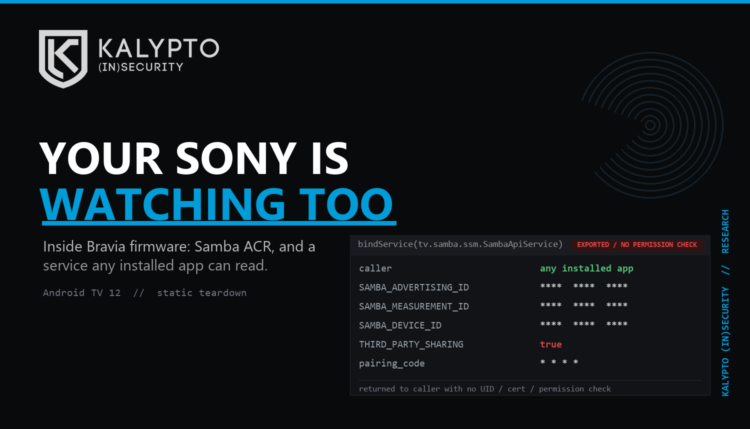
This is the confirmed one, and it is the one I filed. The Samba service that hands out identifiers and privacy state is exported with NO permission check at all. It decides which internal object to give a caller based purely on the action string the caller stuffed into the intent. It never once checks the app’s UID, its package, its signing certificate, or any permission. Nothing.
In English: any app on the TV, with zero special privileges, can bind to that service and read your stable Samba advertising ID, your measurement ID, your ad-personalization and third-party-sharing flags, the device ID, and a pairing code. The kicker is that a permission helper for exactly this already exists in the code… it just is not called on the getters that leak the IDs. Somebody wrote the lock and then never put it on the door.
The backup “OEM” interface is somehow worse. It “authenticates” a caller by comparing a string the caller hands it against values hard-coded in the app itself, which anyone can rip straight out of the APK in about a minute. That is not authentication. That is a bouncer who lets you in because you told him you are on the list.
Be precise about the blast radius, though, because I am not going to oversell it. This leaks the tracking metadata and the IDs, not your raw viewing frames. The frame path is the locked door I just praised. This is the window somebody left cracked open next to it. A sideloaded app can use these IDs to nail your TV to a cross-device ad profile, and read and mess with your privacy state. That is a real problem, it is not a house fire. I told Sony, with the code references and a proof-of-concept that only reads privacy flags and nothing else. That is how you do it.
The ways in
nginx, and this one is only probable. Flip on “Control remotely” and the TV fires up a web stack behind nginx, and the binary calls itself nginx 1.29.1. That version sits square in the vulnerable range for two 2026 memory-corruption bugs in nginx’s rewrite module, and Sony’s config leans on rewrite rules all over a bunch of externally reachable routes. A malformed request might be able to crash or corrupt that proxy. Might. I am calling it probable and not confirmed on purpose, because a version string cannot tell you whether Sony backported the fix and left the number alone. Settling it needs a binary diff or a careful live test, and I was not about to fuzz the family television.
Pairing over plaintext. In the normal out-of-the-box defaults, the remote-control API pairs and talks over plain HTTP on port 80, not HTTPS. If your TV kept those defaults, anything else on your network can potentially watch or tamper with the pairing and session traffic. You still have to pair, so it is not a free pass… but “authenticated in cleartext on the LAN” is not where you want to be living.
And a whole junk drawer of unlocked local doors. Past Samba, a stack of the TV’s own services are exported with no permission required: one that kicks off OTA update searches, one that opens the hidden service and diagnostic menu without the secret remote key combo, telemetry collectors that will eat whatever a local app feeds them and hand back a stable device ID, and a remote-support piece whose session state leaks and whose session can seemingly be killed by another app. None of these is remote root. Every one of them is something a sketchy app you installed can reach and rattle when it should not be able to touch it at all.
Two things I want to be fair about instead of hyping. The four-digit pairing PIN is generated with a weak, time-seeded random function, which is sloppy, but there is a token and a retry lockout wrapped around it that take the wind out of the obvious brute force. And the permissive file mode on the generated TLS key is real in the code, but Android’s SELinux may stop an ordinary app from ever reaching it. Both need a live TV to call genuinely exploitable, so that is where they sit.
The insides are ancient
Remember the thing I keep ranting about, the installed base outliving its own security support? Here it is again, in a box you can buy today. This 2026 TV is built on Android 12, a Linux kernel in the 4.19 line, a Node.js that went end-of-life earlier this year, a Chromium WebView from early 2024, and the nginx above. Some of that gets patched out of band through Google Play, and Sony may quietly backport fixes, so I am not going to auto-pin a CVE to every stale number. But the shape of it is the shape of it. The panel hangs on your wall for fifteen years. The software stopped being fresh a long time before that, and the gap only grows.
So what do you actually do about it?
- Turn off Control remotely, Remote start, IP control, and network standby unless you genuinely use them. That shuts the whole web stack, nginx and all.
- Walk the Samba TV privacy settings and switch off what you do not want. Then, if you are the paranoid sort, confirm it with a traffic capture instead of trusting the toggle, because I could not verify from an offline image that the toggle actually kills every path.
- Stop sideloading garbage. The confirmed hole needs a local app to abuse it, so the bad app has to get on the TV first. Keep the app list boring.
- Stick the TV on its own network segment that cannot see your computers or your NAS. It is an untrusted appliance. Treat it like one.
- Keep firmware, Play components, and WebView updated, and switch developer mode and ADB back off the second you are done poking at it.
Two brands now, two operating systems, and the identical animal underneath the paint. A television that fingerprints your screen for the ad business, wrapped in a network stack stuffed with features you never asked for, a few of them left hanging open. I keep buying these things, cracking them open, and finding the same thing looking back at me.
It is not the TV I mind. It is that nobody sold it to me as a computer that watches. So do the boring stuff above, and stop assuming the expensive glass on your wall is on your side.